

Daunt
MLG Pro
So as we get more and more into making and tweaking our own setups I thought it wise to share basic fundamental knowledge of how a race car works, each component, to get a better understanding of how to set the car up. With this, you can really understand what might need to be tweaked in car and really understand, when you move something 1 or 2 clicks, is really happening.
I'm taking a lot from a couple books in racecraft I've read, namely "Ultimate Speed Secrets: The Complete Guide to High-performance and Race Driving" from Ross Bentley as well as "Going Faster! Mastering the Art of Race Driving" by Carl Lopez and Danny Sullivan. Another excellent source is http://iracing.wikidot.com/ which acts as a great setup wiki for iRacing.
Part 2: In-Car Settings
I know I said the next guide was going to be about balance and tires, but I decided to change that for this. The next guide will be about balance and tires.
This part is going to be a pretty easy guide and will contain a lot of what you probably already know. But it might not and I'd like to cover the bases. This guide will be pretty short as a driver doesn't have unlimited options on tweaking the car while driving, and varies greatly from car to car. Some cars have almost no control built in, while others have a whole slew of settings to help get the most out of every turn and straight. I'm going to go over the more common ones, so if you're expecting me to touch upon all the F1 adjustments, you'll have to look elsewhere for that help.
Brake Bias
One of the most basic yet extremely important settings is the brake bias. Found on almost all race cars, it is expressed as a percentage, this setting allows you to move braking power distribution from front / back to control which wheels lock first. This percentage indicates how much brake pressure is applied to the front brakes (relative to the rear). So 48% brake bias means that 48% of the pressure is applied to the front brakes.
Because the optimum braking efficiency is just before tire lockup, you'll want the tires to lock up at the same time, though not always. When the fronts lock first, the car will lose traction in the fronts (obviously) which will just result in a slide forward. When the rears lock first the rear will swing around, making for a very unstable brake zone. There are advantages and disadvantages to further increasing or decreasing the bias.
Increasing <front> brake bias (larger percentage, more pressure to the front brakes) gives more stable braking but underutilizes the rear tires. They could do more braking and thus is not efficient and as fast. Overall though the fronts locking first is a manageable characteristic that is forgiving and allows the driver to adjust.
Decreasing <front> brake bias (smaller percentage, more pressure to the rear brakes) gives overall better braking efficiency but when the rears lock, the rear end will swing out, creating very scary oversteer that is a lot more unforgiving than the fronts locking. Trail braking also suffers.
Adjusting the car's bias as a race goes on is very common and something all drivers benefit from. Increased front tire wear might mean the stopping power of the fronts is suffering, causing lockup when it wasn't before. Decreasing the bias will give more braking power to the rears to help lessen the load on the fronts that are locking.
Traction Control
The very controversial traction control (TC) is a setting that prevents wheel spin on throttle application. So at low to medium speeds, this system will not allow wheels to spin and therefor oversteer on throttle to occur.
Typically this setting has a wide range of applications from completely off, to some assistance, major assistance and full assistance, depending on the car.
If you're struggling with on-throttle oversteer, this is one of the first settings you should look at increasing to help prevent it. Generally it's not the most ideal, as it means less control over throttle application and slower gradual increase.
ARB Arms
Again, very car dependent, this setting allows you to easily adjust the ARB arms (front and back). For a detailed explanation of ARB arms, see my first guide: http://bandofothersgaming.com/forum/showthread.php/2758-Setup-Guide-Series-Ep-1-Suspension-Basics
Fuel Map
A relatively common setting, fuel map is not used very often for sprint races but can be a lifesaver. If you need to conserve fuel, you can increase fuel mapping (every car will have a default fuel map, which basically means it isn't conserving fuel) which will help save fuel. Don't expect it to turn into a prius though.
Throttle Shaping
Some cars have the ability to shape the throttle. This means it's tweaking throttle input (how much you're moving the pedal) and applying a specified amount of throttle. The degree to which this can be done varies. Some cars have 10 settings, some have only 3, or might not have any.
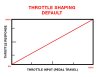
Every car that has it will have a base setting, which is completely linear. At this setting, as per the graph below, you will see with 25% foot travel, you will get 25% throttle. At 60% you get 60% throttle, and so on. Its 1:1.
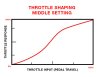
At a middle setting the graph changes (see below). No longer is 25% foot travel 25% throttle. It's closer to only 15% response. We'll talk more about how it affects driving in a moment.
At the highest setting, the graph changes even more. The pattern becomes more and more of an S. See below. The 25% earlier is hardly even 10% in this example.
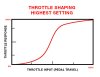
What this means is that at the beginning and end of throttle travel, you will get less and less power as you increase throttle shaping. This is another way of dealing with getting on the throttle too soon. As a result of this change at the highest settings, all of your throttle application is in the middle of the throttle travel. Going from 40% pedal to 60% pedal brings you from about 30% throttle to 70% going by my crude chart. Keep in mind these aren't exact, just gives you an idea of how it works.
ABS
A lot of the production-based race cars tend to feature ABS controls, while purpose-built race cars will leave this out. ABS (Anti-lock braking system) prevents wheels from locking up under braking.
Generally it is better to use a little ABS assistance as possible, because with feel a driver can sometimes get more out of braking (and stop faster) without ABS then with. If you're having trouble and locking up the brakes occasionally, it might be best to increase this setting. You can use this in conjunction with the brake bias setting to eliminate wheel lock up under braking.
Conclusion
Hopefully these settings will help you not just dial the car in to start, but help you throughout the race. Their biggest advantage is the ability to easily change these settings without pitting, so knowing what each does and recognizing when a setting needs changing mid-race is not just important but will vastly improve your driving.
Next Guide:
Tires, Balance & Weight Distribution
I'm taking a lot from a couple books in racecraft I've read, namely "Ultimate Speed Secrets: The Complete Guide to High-performance and Race Driving" from Ross Bentley as well as "Going Faster! Mastering the Art of Race Driving" by Carl Lopez and Danny Sullivan. Another excellent source is http://iracing.wikidot.com/ which acts as a great setup wiki for iRacing.
Part 2: In-Car Settings
I know I said the next guide was going to be about balance and tires, but I decided to change that for this. The next guide will be about balance and tires.
This part is going to be a pretty easy guide and will contain a lot of what you probably already know. But it might not and I'd like to cover the bases. This guide will be pretty short as a driver doesn't have unlimited options on tweaking the car while driving, and varies greatly from car to car. Some cars have almost no control built in, while others have a whole slew of settings to help get the most out of every turn and straight. I'm going to go over the more common ones, so if you're expecting me to touch upon all the F1 adjustments, you'll have to look elsewhere for that help.
Brake Bias
One of the most basic yet extremely important settings is the brake bias. Found on almost all race cars, it is expressed as a percentage, this setting allows you to move braking power distribution from front / back to control which wheels lock first. This percentage indicates how much brake pressure is applied to the front brakes (relative to the rear). So 48% brake bias means that 48% of the pressure is applied to the front brakes.
Because the optimum braking efficiency is just before tire lockup, you'll want the tires to lock up at the same time, though not always. When the fronts lock first, the car will lose traction in the fronts (obviously) which will just result in a slide forward. When the rears lock first the rear will swing around, making for a very unstable brake zone. There are advantages and disadvantages to further increasing or decreasing the bias.
Increasing <front> brake bias (larger percentage, more pressure to the front brakes) gives more stable braking but underutilizes the rear tires. They could do more braking and thus is not efficient and as fast. Overall though the fronts locking first is a manageable characteristic that is forgiving and allows the driver to adjust.
Decreasing <front> brake bias (smaller percentage, more pressure to the rear brakes) gives overall better braking efficiency but when the rears lock, the rear end will swing out, creating very scary oversteer that is a lot more unforgiving than the fronts locking. Trail braking also suffers.
Adjusting the car's bias as a race goes on is very common and something all drivers benefit from. Increased front tire wear might mean the stopping power of the fronts is suffering, causing lockup when it wasn't before. Decreasing the bias will give more braking power to the rears to help lessen the load on the fronts that are locking.
Traction Control
The very controversial traction control (TC) is a setting that prevents wheel spin on throttle application. So at low to medium speeds, this system will not allow wheels to spin and therefor oversteer on throttle to occur.
Typically this setting has a wide range of applications from completely off, to some assistance, major assistance and full assistance, depending on the car.
If you're struggling with on-throttle oversteer, this is one of the first settings you should look at increasing to help prevent it. Generally it's not the most ideal, as it means less control over throttle application and slower gradual increase.
ARB Arms
Again, very car dependent, this setting allows you to easily adjust the ARB arms (front and back). For a detailed explanation of ARB arms, see my first guide: http://bandofothersgaming.com/forum/showthread.php/2758-Setup-Guide-Series-Ep-1-Suspension-Basics
Fuel Map
A relatively common setting, fuel map is not used very often for sprint races but can be a lifesaver. If you need to conserve fuel, you can increase fuel mapping (every car will have a default fuel map, which basically means it isn't conserving fuel) which will help save fuel. Don't expect it to turn into a prius though.
Throttle Shaping
Some cars have the ability to shape the throttle. This means it's tweaking throttle input (how much you're moving the pedal) and applying a specified amount of throttle. The degree to which this can be done varies. Some cars have 10 settings, some have only 3, or might not have any.
Every car that has it will have a base setting, which is completely linear. At this setting, as per the graph below, you will see with 25% foot travel, you will get 25% throttle. At 60% you get 60% throttle, and so on. Its 1:1.
At a middle setting the graph changes (see below). No longer is 25% foot travel 25% throttle. It's closer to only 15% response. We'll talk more about how it affects driving in a moment.
At the highest setting, the graph changes even more. The pattern becomes more and more of an S. See below. The 25% earlier is hardly even 10% in this example.
What this means is that at the beginning and end of throttle travel, you will get less and less power as you increase throttle shaping. This is another way of dealing with getting on the throttle too soon. As a result of this change at the highest settings, all of your throttle application is in the middle of the throttle travel. Going from 40% pedal to 60% pedal brings you from about 30% throttle to 70% going by my crude chart. Keep in mind these aren't exact, just gives you an idea of how it works.
ABS
A lot of the production-based race cars tend to feature ABS controls, while purpose-built race cars will leave this out. ABS (Anti-lock braking system) prevents wheels from locking up under braking.
Generally it is better to use a little ABS assistance as possible, because with feel a driver can sometimes get more out of braking (and stop faster) without ABS then with. If you're having trouble and locking up the brakes occasionally, it might be best to increase this setting. You can use this in conjunction with the brake bias setting to eliminate wheel lock up under braking.
Conclusion
Hopefully these settings will help you not just dial the car in to start, but help you throughout the race. Their biggest advantage is the ability to easily change these settings without pitting, so knowing what each does and recognizing when a setting needs changing mid-race is not just important but will vastly improve your driving.
Next Guide:
Tires, Balance & Weight Distribution
Last edited:

