

little P
Super Mod
As I've got really into DCS and have bought a couple of modules on top of existing content I want to keep track of what action I've assigned to what button/dial until it becomes second nature, and even then I can see this being a useful resource for reminding yourself what button does what when jumping between modules or if you've been away from the sim for a while...
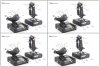
So I have the X-52 pro and in case anyone else has one (or even a regular X-52 this will work) I made a little template so you can label it up according to your layout. I recommend using a pencil until you're completely happy with your layout, and as the X52 has the 3 mode switch and the clutch (if you have it enabled) which effectively means each button has four potential functions you can always use a red/purple/blue pen to show what does what in each mode (corresponds to each colour LED on the mode switch) and a different colour pen for clutch mode. That's just me though, it's up to you how you want to use it I just wanted to throw it out there in case it helped anyone else
I've put four on one sheet of A4 which allows them to be cut if you wish or just keep them on one sheet for easy reference like I do.
So I have the X-52 pro and in case anyone else has one (or even a regular X-52 this will work) I made a little template so you can label it up according to your layout. I recommend using a pencil until you're completely happy with your layout, and as the X52 has the 3 mode switch and the clutch (if you have it enabled) which effectively means each button has four potential functions you can always use a red/purple/blue pen to show what does what in each mode (corresponds to each colour LED on the mode switch) and a different colour pen for clutch mode. That's just me though, it's up to you how you want to use it I just wanted to throw it out there in case it helped anyone else
I've put four on one sheet of A4 which allows them to be cut if you wish or just keep them on one sheet for easy reference like I do.
Attachments
-
 299.5 KB Views: 419

