Pagefile?

little P

Super Mod
Ok so I know I've got new bits coming, but I've been getting more and more into this stuff, so I had a fiddle about, and at times my disk usage was just ridiculous. It's definitely the source of the stuttering in my opinion.
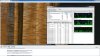
Untitled.jpg

I've now disabled the pagefile entirely. Hey presto, no stuttering.

My question is, am I doing the right thing?

It has solved the stuttering and hanging, I was getting blue screen of deaths regularly, especially when running an avg scan or something like that.

Or am I on completely the wrong track.

All I know is by disabling the pagefile, the horrible stuttering and sound hanging have completely gone.

EDIT: hmm... still slight stuttering in game, but no sound hanging now. idk. this is all so bl00dy confusing. Videos on the other hand seem to be completely cured of it.
 
Last edited:

HaJa

Hardcore
that tells me that your drivers are indeed of. Have you made sure that
it isn't a problem with IDE / AHCI (SATA) driver! If you have SATA and
the MB thinks it should treat them as IDE or if the MB is set to AHCI but
the OS think it is IDE then you'll have access problems.

To clarify, even if you have the correct drivers for you MB and chip set
the OS won't recognise SATA AHCI if the MB BIOS isn't set to that choice.

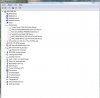
start a CMD prompt as admin and type the following (without quotation):
"set devmgr_show_nonpresent_devices=1" (enter)
"devmgmt.msc" (enter)

and then in the manager go to "show" and "hidden devices".
This will let you show all that the OS tries to load and all that is grey
is absent. If you are certain that the parts or drivers marked in grey are
not in use you can delete them.

It should also show that the drivers for the disks are SATA AHCI.
se picture below :)

Skärmklipp.JPG
 

little P

Super Mod
that tells me that your drivers are indeed of. Have you made sure that
it isn't a problem with IDE / AHCI (SATA) driver! If you have SATA and
the MB thinks it should treat them as IDE or if the MB is set to AHCI but
the OS think it is IDE then you'll have access problems.

To clarify, even if you have the correct drivers for you MB and chip set
the OS won't recognise SATA AHCI if the MB BIOS isn't set to that choice.

start a CMD prompt as admin and type the following (without quotation):
"set devmgr_show_nonpresent_devices=1" (enter)
"devmgmt.msc" (enter)

and then in the manager go to "show" and "hidden devices".
This will let you show all that the OS tries to load and all that is grey
is absent. If you are certain that the parts or drivers marked in grey are
not in use you can delete them.

It should also show that the drivers for the disks are SATA AHCI.
se picture below :)

View attachment 564
I think you're onto something here Haja...

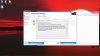
I followed your instructions and this was the result...

hmmmm.jpg

SCSI Disk Device...

Now the obvious question is how do I change it to SATA, and do you think that's what the problem is?

Fascinating stuff all this :)
 

HaJa

Hardcore
Check what you have under IDE controllers first.

The disc shouldn't show as a SCSI (Small Computer System Interface) if its a SATA disc or IDE disk. I assume you have a SATA3 disk?

Check also in BIOS of the mainboard what the disc interface are set to be identified as.
Don't know how your ASUS BIOS look like so I can't tell where to look.
 

little P

Super Mod
Erm, not sure if it's SATA 3 , but it is SATA connected via SATA cable to the mobo. This is the new HDD;

http://www.amazon.co.uk/gp/product/B005GOTMR2/ref=oh_details_o04_s00_i00?ie=UTF8&psc=1

I had a look in the bios and found it was listed as IDE. I changed it to AHCI in the bios and re-booted after saving but it is still listed as an SCSI in device manager.

I have read that if you install windows with the bios setting as IDE (which would have been done when I updated the bios as it reset to defaults) then you can't then change it to AHCI easily. So I think a re-install of windows might be in order... does that make any sense?
 

little P

Super Mod
Also, I downloaded Seagate Seatools to check if I have a faulty HDD, worth a check while I wait for a reply I thought, and it doesn't even pick up the Hard drive. It picked up the external and a flash stick I had in, but not the main Hard Drive... Something weird is going on...
 

little P

Super Mod
Hmm... Ok another dead end then. My hdd is sata 3 but apparently that's backwards compatible anyway. So no closer to solving the stuttering. I'm going to do a fresh install of Windows
 

HaJa

Hardcore
Go to ASUS page an DL the latest drivers directly from ASUS.
ASUS has a naughty habit of tweaking their own drivers so that
standard drivers doesn't work properly and thus take many month
to come out with drivers of their own. That's why I don't like ASUS any more.

In any case you want the drivers that are meant to be installed at the time
of windows install.

Check windows forum on how to tell W7 to install a driver to use instead of
the drivers that is on the DVD.
 

little P

Super Mod
Hmm... Ok So I did a fresh install of windows, formatted the drive etc.

Re-installed everything BUT not updating the Mobo drivers, as that was the only thing I was suspicious of.

I also went in and altered the registry

HKEY_LOCAL_MACHINE\System\CurrentControlSet\Services\Msahci

Changed the value from 3 (default) to 0 after reading up on how to switch a drive from IDE to AHCI mode post installation.

Now playing a 1080p VLC movie, have opened up 10 tabs in Chrome and got them loading different websites and no lag whatsoever.

A few nights ago I did an AVG sweep of the entire system and it did pick up two Trojans. I'm wondering if they were lingering even after AVG did it's thing and removed them... That plus I all these issues started when I updated the mobo drivers on that last OS installation.

So in short it seems I finally have the system back to where it was before this whole mess started... I know it doesn't matter as I'm upgrading (the mobo came in the post today) but I figured if this system is now defunct I may as well use it as a tool to try and learn more about the inner workings of a PC.

Only thing I'm concerned about now is a separate issue with the HDD.

The documentation included with the new motherboard says that if this HDD is set to IDE by my current OS installation, then if I put it on the new motherboard which has the ports set to SATA as default, I won't be able to boot windows. I'm assuming a fresh install once the HDD is linked to the new motherboard will negate this issue, as it would only be a problem if you were just hoping to plug and play the new HDD.
 
Last edited:

HaJa

Hardcore
You need to do a fresh install of W7 since you change almost everything about your system!
New chip set, new CPU, new GPU and so on. To avoid leaving any old registry strings in place
messing up the new system I strongly recommend wiping the HDD clean and reinstall. If you have more than one drive I recommend installing just with the OS drive first and then
shut down the system and plug in the rest.
 

HaJa

Hardcore
Use the software that came with the disc and boot from a CD/DVD with them on it
and wipe the HDD clean. Then boot with the W7 disc and install and partition as
you like.
 

little P

Super Mod
Ok, I only have one drive I'm putting in for now, the 500gb Barracuda.

So, what is the best and cleanest way to install this.

This is the part I'm a little worried about, but I have confidence now that I can do this right.

I'll be putting all the components in a new case.

The new components are;

New PSU
New Mobo
New RAM
New CPU
New GPU
New CPU Cooler
The Barracuda drive with my current install of Win 7.

So in what order do I put these things in, and what's the best way of making sure I have completely formatted the drive before installing Windows? (Which I'm getting good at as I've done it three times over the last week lol)

I've rtfm but unfortunately it has every language but English... :rolleyes:

Thanks for your advice :)
 

HaJa

Hardcore
Useful info of the Barracuda here:
http://www.seagate.com/support/internal-hard-drives/desktop-hard-drives/barracuda/

Read about checking upgrading firmware.

Before putting the new system together download the utilities from this page:
http://www.seagate.com/support/downloads/

Create a boot able CD/DVD as per the instructions for the tools.

Put the new system together and set the controllers for SATA and AHCI in
the BIOS. Boot with the utility CD you created before and then erase
the drive and create the partition. You can also use the tools to check
for problems and also
 

little P

Super Mod
Well, I've sent this back for a refund and as Duke recommended them I've ordered a Western Digital Caviar Black. This whole saga has put me off Seagate drives now... What a pain in the ass! At least I won't be putting this p.o.s. drive in the new pc...
 

HaJa

Hardcore
Good for youto notice it now. WDC drives are good drives. Seagate has
a rep lately of not so good.
 

HaJa

Hardcore
By the way, W7 has a little tool to capture just what you want on the desktop.
No need to take a screenie anymore. don't know the english name but in swedish
it's "skärmklippverktyget" ;)
 

Twitch

Latest posts

iRacing Special Events 2026

ROAR: LMP3, GT4, Touring
  ~ Jan 9 - 10
Daytona 24: GTP, LMP2, GT3
  ~ Jan 16 - 18
Bathurst 12: GT3
  ~ Feb 20 - 22
Sebring 12: GTP, LMP2, GT3
  ~ Mar 27 - 29

Forum statistics

Threads
3,839
Messages
48,081
Members
626
Latest member
PÉ DÍ PÁNO
Top Bottom