Raise alert level to Defcon 4...

little P

Super Mod
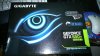
This is the first decent gfx card I've bought since the Radeon 9800pro was considered good, it came today in the post and I'll have to admit to being more excited than I was when I went to visit the Guiness and Ginsters pie factory in one day...
1149720_10201687543615232_1184729241_o.jpg

Those of you who knew what happened the last time I tried to install a video card (aforementioned 9800pro) will know that what I'm trying to do today may mean you never see me again.

So, wish me luck, and here goes...

Missions for today;

- Install new Corsair CX600 PSU (done before)
- Install new Seagate 500gb HDD (never done before)
- Install new copy of Windows 7 64 bit (never done before)
- Install new 650ti boost (done before, but didn't go too well *boom*)

*gulp*
 

little P

Super Mod
lmao don't joke about it I've already fucked it up but I'm starting again :/

question - if I have 2x2b corsair ddr2 running in dual channel mode (same brand, speed etc.), can I use the old 2gb ddr stick (which I took out but was working fine) in another slot to increase it to 6gb? Or will that not work.
 

Kenadian

Staff member
Site Admin
lol that's actually a good question and the answer is that I'm not entirely sure? I only use pairs of RAM so whether or not you can use single sticks is beyond me?

The only thing I do know is that if your old stick of RAM is lower frequency than the new stuff, the new stuff will be forced to run at whatever the maximum bandwidth is of the old stick.

What does your Motherboard Handbook say about RAM installation?
 

Kenadian

Staff member
Site Admin
lol I have an even safer option yet; get someone who knows what their doing to put it together for you little P.
 

little P

Super Mod
Ok I'm on my phone. Quick update, I have no idea what I'm doing and it's a miracle nothing has broken... Yet. After many confusing things happening and a lot of weird noises I think I'm getting somewhere. I did think about anti static measures but I'm wearing a durex as always s o I'm golden. . I also had to use tinsnips on the case but it's all good... Maybe
 

little P

Super Mod
Ok, I'm back. I haven't been blown up but...

I have a few problems I'm hoping you can help me with.

First, my pc is running very jerky. Ctrl alt del reveals my cpu is being spiked to 100% and even when it's not nothing is working properly.

I finally got the drivers installed for the 650ti. Screen now displaying properly but... I didn't realise it didn't have a vga connection. So I'm using hdmi and the colours are washed out and text is almost blurred... For example the orange text all over this site is very dull and washed out, and the "reply" and "reply with quote" buttons are blurry. In fact, everything red is blurry. wtf is going on?!

Web pages are taking longer to load, and loading in chunks. And it's just jerking around whatever I do...

Help please? little P is confused. :(
 

little P

Super Mod
Ok well obviously the colours being washed out is because it's hdmi and my monitor colour settings etc. are different from the vga input. Any idea why my pc is running like crap guys?
 

HaJa

Hardcore
Right mate, post system specs first so we can see whats ticki´n :)
EDIT: noticed that you reinstalled everything, right?
 
1. Just install the paired sticks, if you install the oddball stick it will default to single channel RAM and at the speed of the slowest stick.

2. Put in the Video Card, RAM and CPU on the motherboard first, then POST, after that you can install the hard drive and begin OS install after.

3. As long as it POSTs, you can't have done anything catastrophic, and can always re-format and start clean on the OS and driver intallation.
 

little P

Super Mod
Hi guys, thanks for helping, yes it was a new hardrive so did a fresh install of windows 7.

Haja - What would you like me to post on here and how do I get the info :)

Ogami - I put the new psu, gfx card and hdd in together, then turned it on and installed win 7. Have I done this wrong?

EDIT: The 2gb ram is slower so I'll leave that out, thankyou
 

little P

Super Mod
Also I have researched that I need a DVI-I to VGA adaptor, this variant of card doesn't have vga output :rolleyes: Does this sound right to you?
 

little P

Super Mod
Also, bit more info for you, whenever I try to install anything ie. chrome, steam that's what's killing it, the cpu usage shoots up, and everything jerks around :confused:
 

Kenadian

Staff member
Site Admin
You're the only person I've ever known who actually downgrades when he upgrades lol. :lol:

Most people tend to get improved performance, what a twit.

To get hardware specs dl and run CPUZ: http://www.cpuid.com/softwares/cpu-z.html

I don't know what OS you were using before but if you're now using Windows 7 64 bit it could be the reason your CPU usage is so high as I believe 4GB is the minimum you can run with Win7 64.

Also, check to see you're not running all kinds of useless background apps such as Print Spooler, Automated Updaters, Startup Utilities, etc.; you can do this in msconfig.
 

Engnr

Moderator
With a clean install of the OS, not an overlay, I'd say a driver is messing with you still. Which one is hard to say, maybe the network driver??? Normally if it's on, all the hardware is working correctly so it's software related.

If all else fails, a 6lb sledge always does the trick for me.
 

Twitch

Latest posts

iRacing Special Events 2026

ROAR: LMP3, GT4, Touring
  ~ Jan 9 - 10
Daytona 24: GTP, LMP2, GT3
  ~ Jan 16 - 18
Bathurst 12: GT3
  ~ Feb 20 - 22
Sebring 12: GTP, LMP2, GT3
  ~ Mar 27 - 29

Forum statistics

Threads
3,839
Messages
48,081
Members
626
Latest member
PÉ DÍ PÁNO
Top Bottom